Point of sale · retail & hospitality
Take the money.
Keep the day moving.
Offline-first tills for shops, cafés, bars and takeaways. Lay out your own screens, print your own receipts, and close the day with figures your accountant will accept — on the tablets and laptops you already own.
Free sandbox · no card required · trading in under a minute
01 · The platform
Everything a till needs, out of the box
What a shop or a venue asks for on day one — built, running, ready to show you.
Keeps trading when the line drops
Sales queue on the device with their own receipt numbers and sync back exactly once when you reconnect. No duplicates, no lost sales, no waiting on a router.
Lay out your own till
Drag buttons onto a grid — products, keypad, basket, tables, payments, cash — set the colours, and push it to any till. No code, no ticket to us.
Shop and venue in one
Tables and tabs with held orders, modifiers, courses to the kitchen, discounts, service charge, refunds with the VAT worked back out, and stock that moves as you sell.
Books your accountant will accept
Append-only entries in whole pence, VAT split per rate, trading days that run past midnight, blind cash-ups, and Z reports that cannot be edited once taken.
Staff, on the right side of the counter
Roles by capability, a PIN at the till that works offline, and every sale attributed to whoever took it.
Offers that run themselves
Percentage off, money off, 2 for 1, meal deals — on the days and at the times you choose. Print a single-use QR voucher on the receipt and take it back next visit.
02 · The screen designer
Your counter, your buttons
Every till screen is yours to arrange: what goes where, how big, what colour. Group the fast movers by shift, colour the drinks apart from the food, and put payment where the hand already goes.
Change it at four o'clock and the tills have it at five past — no update to push, no engineer to book.
The real thing
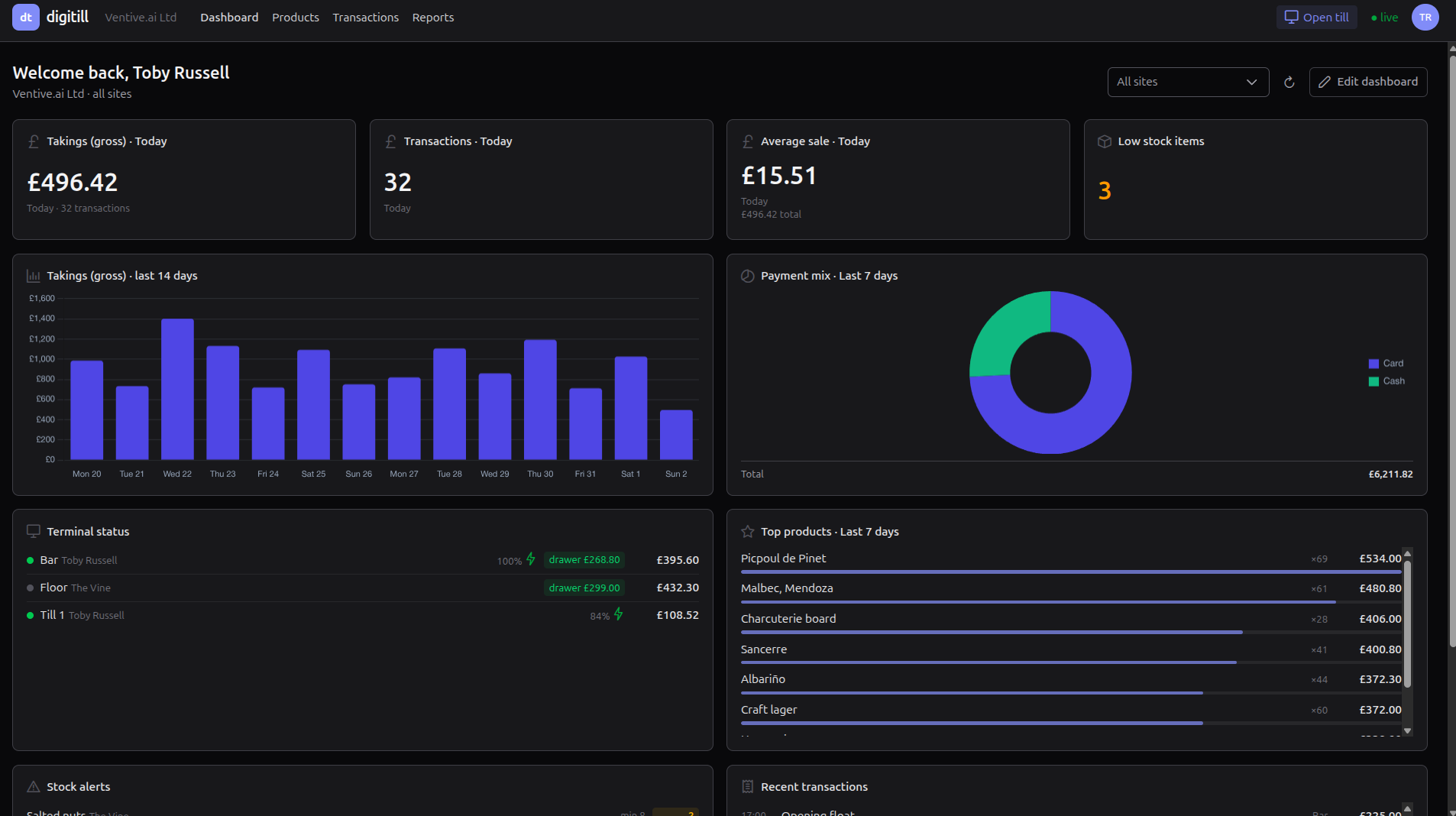
A look at the actual product
Not mock-ups — these are screens from a running workspace with a fortnight of trading behind it.

Tables, tabs and a kitchen that knows what to cook
Draw your floor plan and tap the table. Hold a tab under a name. Send starters now and mains when they are ready, and each station gets only its own tickets. Service charge appears on the bill when it should and comes off when a customer asks.

03 · Devices
Runs on what's already on your counter
The till is a web application in a native shell, so it goes where the hardware already is. No proprietary terminal to buy, no per-platform rewrite, no lock-in to a box.
Android
Native app, sideload or MDM
iOS / iPadOS
Same shell, iPad build
Windows
Full screen in any browser
Linux & macOS
Full screen in any browser
Android ships today as a native app and the same packaging targets iPad. On a desktop the till runs full screen in any modern browser, which covers Windows, Linux and macOS without a separate build.
04 · Hardware
Printers, payments and peripherals
Hardware sits behind stable interfaces instead of being welded into the sale, which is what makes a mixed estate practical to support.
Receipt printers
Bluetooth ESC/POS, with receipts you design yourself — your logo, your wording, per site. The whole receipt is drawn on the device, so it prints when the network is down. The drawer opens off the printer, so there is no second driver to support. Counter printers over the network are next.
Card readers
The till tells a certified reader an amount, the reader takes the card, the till gets a result back. Card numbers never enter the platform or the database. Stripe Terminal first, others behind the same adapter.
Scanners and the rest
USB scanners work today and a tablet camera reads barcodes. Every device sits behind a stable internal contract, so adding hardware is a small package rather than a rebuild.
05 · Connected
Joined up with the business
Straight into the accounts
One clean daily summary per site posted into Xero — sales by VAT rate, payments by tender, matching the Z report to the penny. New providers plug into the same interface.
Every till in step
Orders, stock and till status travel over websockets, so a change on one till shows on the others and in the back office without anyone refreshing anything.
You see the whole estate
Every till reports in: who is signed in, app version, battery, signal, its last sale, its last error, anything stuck in the queue. Support knows before the phone rings.
Built on its own API
Everything the back office does, it does over the same REST API — tenanted, permission-gated, and proven by the application that uses it.
06 · Try it
Trading in the next five minutes
A sandbox workspace comes up straight away, ready to take money. Nothing to install, nothing to set up first.
Make a workspace
Pick a name and it exists in under a minute — with a site, a till and a working sales screen, ready to take money.
Put your menu in
Products, categories, VAT rates, modifiers. They are on the till the moment you save them.
Ring one up, then pull the plug
Take a sale in the browser or on an Android tablet. Turn the network off and take another: it queues on the device and settles itself when you come back.
Every sale counts.
Spin up a workspace and try it yourself, or get in touch and we'll walk you through it.